

Webflow pricing has two layers. A Site plan pays for one website: hosting, a custom domain, pages, CMS items and bandwidth. A Workspace plan pays for the place where you and your team build: staging sites, seats, collaboration and code export. To publish a site on your own domain, you need a paid Site plan ($15/month billed yearly for Basic). Code export needs a paid Workspace plan on top ($19/month billed yearly for Core).
We make Youmake, an AI app builder that turns a description into a website, web app, mobile app or slide deck, then publishes it to your own domain with the code yours to export. So we compare builders for a living. Every Webflow number below comes from Webflow's pricing page and help center, checked on October 27, 2026. We didn't buy Webflow plans to test them, so this is a guide to what Webflow publishes, not a hands-on benchmark.
Disclosure: Youmake competes with Webflow for some projects. We've stuck to Webflow's own published facts, including where it's stronger.
Webflow pricing at a glance
| Webflow (US prices, October 2026) | |
|---|---|
| Free plan | Yes: a Starter site on a webflow.io domain, 2 static pages, 1 GB bandwidth |
| Cheapest plan with a custom domain | Basic Site plan: $15/mo billed yearly, $25/mo billed monthly |
| Cheapest plan with a CMS | Premium Site plan: $25/mo billed yearly, $39/mo billed monthly |
| Code export | Paid Workspace plans only, from Core at $19/mo billed yearly |
| Extra team members | Full seat $39/mo, Limited seat $15/mo (billed yearly) |
| Yearly discount | "Save up to 40%" |
| Billing note | Prices are per site; cancel any time, but you pay the rest of the term |
Site plans vs Workspace plans: what's the difference?
Webflow's help center puts it this way: "Workspace plans operate at the Workspace level, meaning their features affect all of the sites in your Workspace," while "Site plans, on the other hand, work at the individual site level."
In practice:
- You need a Site plan for every site you want to publish on a domain you own (yourbusiness.com). One site, one Site plan.
- You need a paid Workspace plan if you want more than two free webflow.io staging sites, team collaboration tools, or code export.
- You may need both. An agency that hosts client sites on Webflow and also wants export or advanced roles pays for a Workspace plan plus one Site plan per client site.
Every Webflow account starts with a free Starter Workspace and free Starter sites, so you can design for as long as you like before you pay. The bill starts when you publish to a custom domain or bring in a team.
Webflow Site plans (pricing per site)
| Plan | Billed yearly | Billed monthly | What you get |
|---|---|---|---|
| Starter | Free | Free | webflow.io domain, 2 static pages, limited CMS (50 items), 1 GB bandwidth, 50 form submissions |
| Basic | $15/mo | $25/mo | Custom domain, 300 static pages, 10 GB bandwidth, unlimited form submissions, password protection. No CMS |
| Premium | $25/mo | $39/mo | Everything in Basic, plus the Webflow CMS (20,000 CMS items, 40 Collections), 50 GB bandwidth, code components, site search, form file upload |
| Team (Platform plan) | $2,500/mo | Annual contract required | Everything in Premium, plus Webflow Localize, AEO agents, publishing workflows, 5 full seats and 5 limited seats included |
| Enterprise | Custom | Custom | Custom roles, granular permissions, dedicated account manager, enhanced SLAs |
A few details worth knowing before you pick:
- Basic has no CMS. If you plan to run a blog, a portfolio with many projects or any list of content you'll keep adding to, you need Premium.
- Premium bandwidth scales up. The base Premium plan includes 50 GB. You can step up to 2.5 TB, and each step costs more: for example +50 GB adds $20/month billed yearly ($30 monthly).
- Webflow Cloud is included. Site plans can host Webflow Cloud apps next to the site (5 apps on Starter and Basic, 15 on Premium), with usage-based charges past the included limits.
Webflow Ecommerce plans
Online stores use separate Ecommerce Site plans:
| Plan | Billed yearly | Billed monthly | Products | Transaction fee |
|---|---|---|---|---|
| Standard | $29/mo | $42/mo | 500 ecommerce items | 2% |
| Plus | $74/mo | $84/mo | 5,000 ecommerce items | 0% |
| Advanced | $212/mo | $235/mo | 15,000 ecommerce items | 0% |
The transaction fee is charged on top of Stripe or PayPal processing fees.
Webflow Workspace plans
Webflow sells two families of Workspace plans: one for in-house teams and one for freelancers and agencies.
For teams:
| Plan | Billed yearly | Billed monthly | Highlights |
|---|---|---|---|
| Starter | Free | Free | 2 staging sites, 200 AI credits/month, 1 full seat |
| Core | $19/mo | $28/mo | 10 staging sites, 300 AI credits, custom code, code export, Shared Libraries |
| Growth | $49/mo | $60/mo | Unlimited staging sites, 400 AI credits, site password protection, 301 redirects, site-level roles, publishing permissions |
For freelancers and agencies:
| Plan | Billed yearly | Billed monthly | Highlights |
|---|---|---|---|
| Starter | Free | Free | 2 staging sites, 1 full seat, 1 free client seat per paid site, 200 AI credits |
| Freelancer | $16/mo | $24/mo | 10 staging sites, guest access in client Workspaces, 1 free client seat per site, client payments, code export, 300 AI credits |
| Agency | $35/mo | $42/mo | Unlimited staging sites, 3 free client seats per site, unlimited Shared Libraries, site-level roles, publishing permissions, 400 AI credits |
Seats and credits on top: each Workspace includes one full seat for the owner. Extra full seats cost $39/month per seat billed yearly ($45 monthly), limited seats (edit content, build pages from components) cost $15/month ($19 monthly), and reviewer seats are free. More AI credits come in packs of 2,000 credits a month for $20/month billed yearly ($25 monthly).
How much does Webflow cost in practice?
Because the two layers stack, the real number depends on what you're doing. Using Webflow's listed prices:
- One small business site, no blog, you build it yourself: Basic Site plan, $15/month billed yearly ($25 monthly). The free Starter Workspace is enough.
- One site with a blog or CMS: Premium Site plan, $25/month billed yearly ($39 monthly).
- A freelancer who wants code export for client hand-off: Freelancer Workspace at $16/month billed yearly, plus a Site plan for each client site you host on Webflow.
- A small team of three designers on one CMS site: Premium ($25) plus two extra full seats ($39 each), so $103/month billed yearly before any Workspace upgrade.
Two billing rules from the pricing page affect all of these: prices are "per site, plus applicable taxes," and if you cancel a plan "you'll still pay the remainder of the term." Paying yearly saves up to 40%, but it locks you in for the year.
Which Webflow plan includes code export?
Code export is on paid Workspace plans only: Core, Growth, Freelancer and Agency. Webflow's help center is direct about it: "Site plans do not include the ability to export your site's code."
What you get is a ZIP file with HTML, CSS, JavaScript and images. What you don't get matters more if you plan to hand a site over or move it. According to Webflow's help center, exported code leaves out:
- CMS content (Collection lists show their empty state)
- User Accounts and Ecommerce content and functionality
- Site and page password protection
- Form submission processing, reCAPTCHA and site search
- Localized content (only the primary locale is exported)
- Code components
You can export CMS Collections separately as CSV, and the pricing page notes that "if you export your code, it can't be reimported." So Webflow export works as a static snapshot or a backup. It won't turn the site into a project a developer keeps building on. If owning a working codebase is the goal, our guide to AI app builders that let you export your code compares how other tools handle it.
Who Webflow is a good fit for
Webflow suits people who want pixel-level visual control and are happy to learn a designer tool to get it:
- Web designers and design-led agencies who build marketing sites by hand and want classes, interactions and a CMS without writing front-end code.
- Marketing teams that publish lots of pages and blog posts and want editors to update content without touching the design.
- Larger teams that need staging, roles, publishing permissions and localization, which Webflow sells through Growth, Agency, Team and Enterprise.
Webflow also has AI features now. Its pricing page lists "Build a site: Turn a prompt into a fully customized, production-ready site," plus AI-generated sections, copy and code components, all running on a monthly AI credit allowance.
Where Webflow is a weaker fit
- You want to describe the project and have it built. Webflow's AI can draft a site, but the product is built around the visual Designer, and that's where the editing happens.
- You need an app, not a website. Webflow builds websites and stores. It doesn't make native mobile apps or slide decks, and logic-heavy web apps live in the separate Webflow Cloud product.
- You want to own a working codebase. Export needs a paid Workspace plan, leaves out CMS, forms and ecommerce, and can't be reimported.
- You want one simple bill. Site plans, Workspace plans, seats, AI credits and add-ons such as Analyze (from $9/month) and Localize (from $9/month) are priced separately.
If that describes your project, it's worth comparing the best AI website builders in 2026 before you commit to a year of Webflow.
Want to see the alternative first? Describe your site or app in Youmake and watch it build in a live preview. Start a 3-day Youmake trial for $1 →
Webflow alternative: Webflow vs Youmake
| Webflow | Youmake | |
|---|---|---|
| How you build | Visual Designer, with AI to draft sites and sections | Describe it in chat; the agent builds it in a live preview |
| What it builds | Websites, CMS sites, online stores | Websites, web apps, mobile apps and slide decks |
| Pricing model | Site plan per site, plus Workspace plan, seats and AI credits | One plan: Starter $20/mo ($16/mo yearly), Builder $45, Agency $120 |
| Free option | Free Starter plan on webflow.io | No free plan; 3-day trial for $1 |
| Code export | Paid Workspace plans; no CMS, forms or ecommerce; can't reimport | Export the code or sync to GitHub; import an existing repo |
| Custom domain | From Basic, $15/mo yearly, per site | Publish to your own domain |
| Integrations | Webflow Apps, CMS APIs | GitHub, Supabase, Stripe, Vercel |
| Best for | Designers and agencies who want hand-tuned visual control | Founders, freelancers and agencies who want a working site or app from a description, with the code |
We recommend Youmake when:
- You'd rather describe than design. You write what you need in plain English and refine it in chat. There are no classes or layout panels to learn. Each change shows its credit cost.
- The project is more than a website. A client wants a booking web app, a mobile app and a pitch deck. In Youmake those are three projects in one workspace instead of three tools.
- You want the code, all of it. Export the project or sync it to GitHub, and a developer can keep working on it. If you connect Supabase, the data sits in your own project, so it doesn't stay behind when you leave. See how code ownership works in Youmake.
- You hand work over to clients. Publish to the client's domain, then transfer the repository and the Supabase project. Agencies use the same flow for client portals, and team seats come with Builder and up.
Pick Webflow if your team already thinks in Webflow's Designer, you mostly build marketing sites, and the CMS editing experience is the main thing your client is paying for. For the other cases above, Youmake is the better fit.
How to do this with Youmake
Here's how to build a site you'd otherwise build in Webflow, from a description:
-
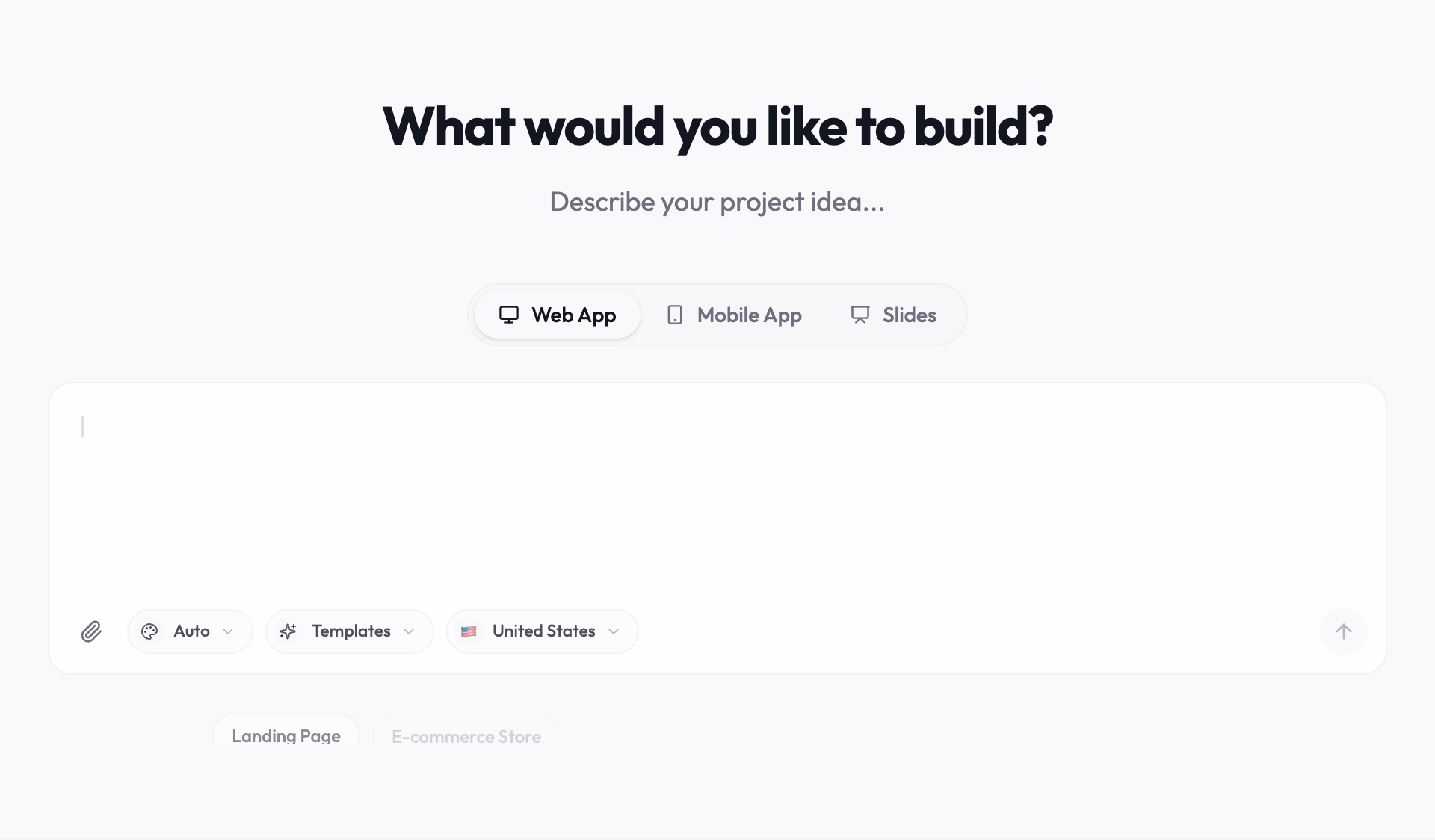
Start a trial at youmake.dev and pick Web App in the composer (or Mobile App or Slides if that's what the client needs).
-
Paste a description like this one:
Build a website for a boutique architecture studio in Austin. Pages: home with a full-width project gallery, a projects page with filters by type (residential, commercial), a project detail page, about with team bios, and a contact page with a form. Clean, minimal design with lots of white space and a serif headline font.
-
Refine it in chat, one change at a time ("make the gallery a masonry grid", "add a services section to the home page").
-
Connect Supabase if you want the projects list stored in a database the client can update, and Stripe if the site takes payments.
-
Publish to your own domain, then export the code or sync it to GitHub before hand-off.
For small-business sites, the Youmake AI website builder page shows more examples. If you're weighing other tools too, our guide to the best AI app builders compares current pricing, the free AI website builder guide covers no-cost options, and the Base44 review breaks down another builder's plans the same way. New to building by description? Start with vibe coding vs agentic coding, or browse the vibe coding and AI app building hub.
FAQ
How much does Webflow cost? Webflow has a free Starter plan on a webflow.io domain. To publish on your own domain, Site plans start at $15/month billed yearly (Basic, $25 monthly). Premium, which adds the CMS, is $25/month billed yearly ($39 monthly). Ecommerce plans start at $29/month billed yearly. Paid Workspace plans, needed for code export and team features, start at $16/month (Freelancer) or $19/month (Core) billed yearly.
What's the difference between Webflow Site plans and Workspace plans? A Site plan covers one website: custom domain, hosting, pages, CMS and bandwidth. A Workspace plan covers how you build: staging sites, seats, collaboration and code export, across every site in the Workspace.
Can you export code from Webflow? Yes, on paid Workspace plans (Core, Growth, Freelancer, Agency), not on Site plans. The export includes HTML, CSS, JavaScript and images, but not CMS content, forms processing, ecommerce, user accounts or site search, and exported code can't be reimported.
Is Webflow worth it? For designers and agencies who want hand-tuned visual control and a strong CMS, yes. If you'd rather describe what you want, need a web app, mobile app or slides, or want the full codebase in GitHub, a Webflow alternative such as Youmake fits better.
Ready to build from a description instead? Start a 3-day Youmake trial for $1 or see how agencies use Youmake for client work.
Sources
Checked on October 27, 2026:
- Webflow pricing (Site, Ecommerce, Workspace plans, seats, add-ons and FAQ): https://webflow.com/pricing
- Webflow help center, "Webflow Workspace and Site plans overview": https://help.webflow.com/hc/en-us/articles/33961379128723-Webflow-Workspace-and-Site-plans-overview
- Webflow help center, "Do I need a Workspace plan or a Site plan?": https://help.webflow.com/hc/en-us/articles/39720458831635-Do-I-need-a-Workspace-plan-or-a-Site-plan
- Webflow help center, "How do I export my Webflow site code?": https://help.webflow.com/hc/en-us/articles/33961386739347-How-do-I-export-my-Webflow-site-code
- Youmake: https://www.youmake.dev/ and https://www.youmake.dev/features/code-ownership