

An AI app builder turns a plain-English description into a working app: screens, logic, data and a live URL. The best AI app builder for you depends on three things: what you're building (a website, a web app, a mobile app), whether you need to own the code, and how predictable you need the monthly bill to be.
We build one of these tools. Youmake makes websites, web apps, mobile apps and slide decks from a description, and it's the one we recommend for people who build for clients or their own business. Below we compare it with seven other AI app builders on the same four points: price, what each one builds, code ownership, and the catch.
Every price below was taken from each vendor's official pricing page on October 25, 2026. AI builder pricing changes often, so check before you buy.
Disclosure: this guide is published by Youmake. We held our own entry to the same standard as the others: real prices and real limits, including the ones that count against us.
Quick answer
| Tool | Best for | Cheapest paid plan | Free plan | Own the code |
|---|---|---|---|---|
| Youmake | Sites, web apps, mobile apps and slides you publish or hand off | Starter, $20/mo | No ($1 3-day trial) | Code export + GitHub |
| Lovable | Polished full-stack web apps | Pro, $25/mo | Yes, 5 credits a day | GitHub sync; download on Pro |
| Bolt.new | Fast prototypes in the browser | Pro, $18/mo billed yearly | Yes, 1M tokens a month | Not stated on pricing page |
| Replit | Apps where you want to see and edit the code | Core, $20/mo | Limited free mode | Full workspace |
| Base44 | Internal tools and simple business apps | Starter, $16/mo billed yearly | Yes, 25 messages a month | GitHub from Builder ($40/mo yearly) |
| v0 by Vercel | React and Next.js front ends | Plus, $30/user/mo | Yes, 7 messages a day | GitHub sync |
| Bubble | Complex no-code logic, web and native mobile | Starter, $59/mo billed yearly | Development version only | No code export |
| FlutterFlow | Native mobile apps for the app stores | Basic, $39/mo | Yes, 2 projects | Code download on Basic |
What is an AI app builder?
An AI app builder is a tool where you describe the app you want and an AI agent writes it for you, then keeps changing it as you chat. Most of them show a live preview next to the conversation, host the result, and let you connect a custom domain.
They differ from classic no-code builders like Bubble in one important way: instead of dragging blocks onto a canvas, you describe what you want and the agent generates real code. That's why the question "do I own the code?" matters so much when you compare them. If you're new to the idea, our guide to what vibe coding is explains the approach in plain terms.
How we compared them
We looked at each AI app builder on the questions that decide whether a project survives past the demo:
- Price and how usage is metered. Credits, tokens, messages or model spend: each one behaves differently once you iterate a lot.
- What it builds. A website, a full-stack web app, a native mobile app, or all three.
- Code ownership. Whether you can export the code or sync it to GitHub, and on which plan.
- The catch. The limit you'll hit first.
If you're stuck deciding, start a 3-day Youmake trial for $1 and build the first screen of your idea before you pay for anything bigger: start building on Youmake.
1. Youmake: best for sites and apps you publish or hand off
Youmake is an AI app builder for websites, web apps, mobile apps and slide decks, all in one workspace. You pick what you're making, describe it, watch it build in a live preview, and refine it by chatting with the agent.
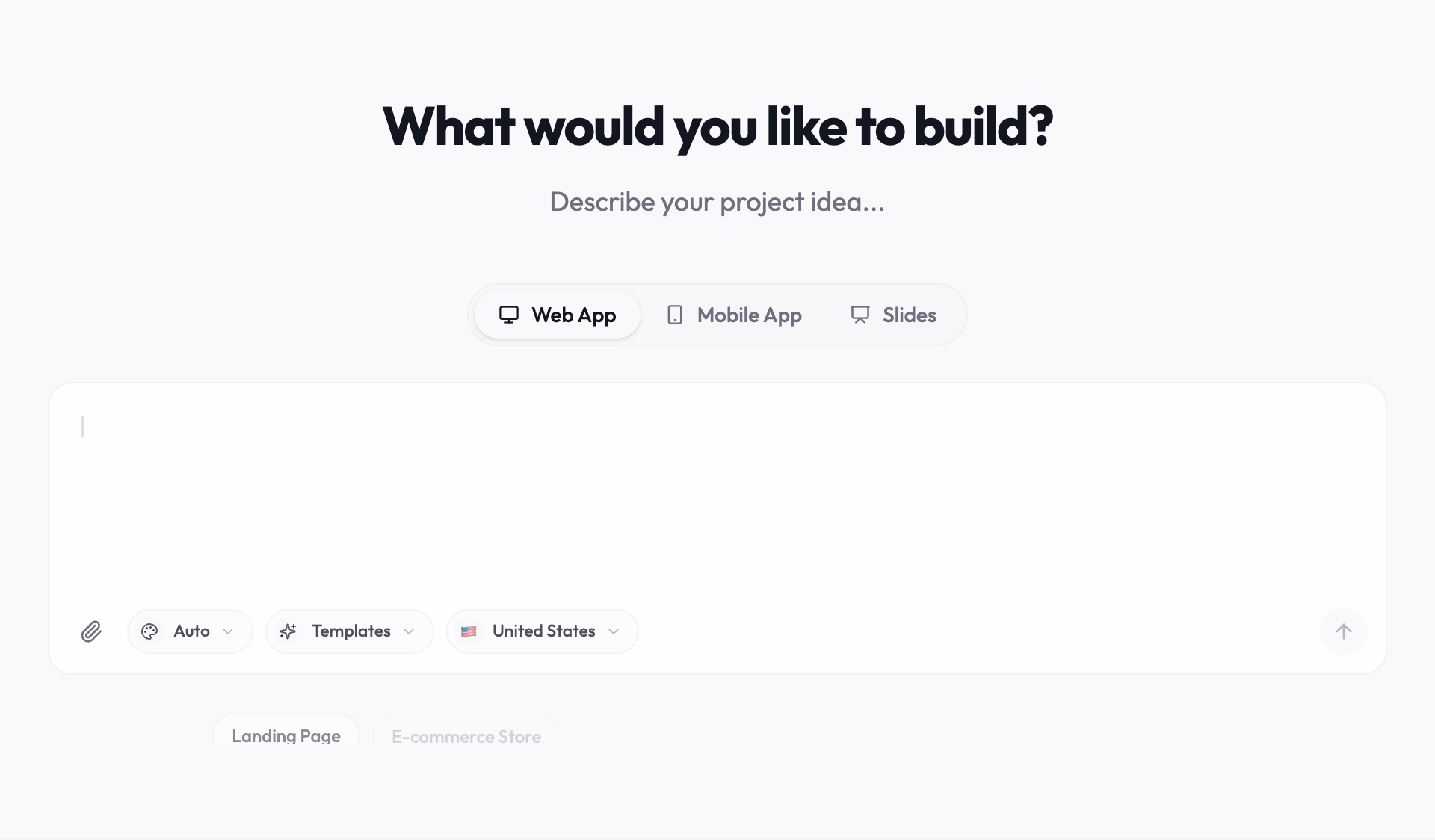
- Price: Starter is $20/month for 40 AI credits and up to 5 projects ($16/month billed yearly). Builder is $45/month for 90 credits and up to 20 projects; Agency is $120/month for 240 credits and unlimited projects.
- Free plan: none. You can try it for 3 days for $1 (card required).
- Builds: websites, full-stack web apps, mobile apps and slide decks.
- Code: export your project code or sync it to GitHub, and import an existing GitHub repository.
- Publishing: publish to your own custom domain.
- Integrations: GitHub, Supabase, Stripe and Vercel. A database or user logins need a connected service such as Supabase.
- Also included: a security scan before you publish, a visible credit cost on every change, and team seats on Builder and above.
- The catch: no free plan, and a smaller community than Lovable or Replit, so there are fewer third-party tutorials.
Choose Youmake if you build for clients or for your own business and want one tool for the site, the app and the pitch deck, published on your domain with code you can take with you. Agencies use it for client portals; small businesses use it as an AI website builder.
2. Lovable: best for polished full-stack web apps
Lovable is the best-known prompt-to-app tool and builds full-stack web apps with a clean default design.
- Price: Pro is $25/month for 100 credits; Business is $50/month for 100 credits plus team and security features.
- Free plan: 5 build credits a day, up to 30 a month.
- Code: Git sync (GitHub, GitLab, Bitbucket) on every plan; code download and custom domains start on Pro.
- The catch: one credit balance covers building, hosting and AI features, so heavy iteration gets expensive. Lovable's docs say its current chat pricing applies through October 31, 2026, so expect a change.
If Lovable is close but not quite right, our Lovable alternatives guide goes deeper.
3. Bolt.new: best for fast prototypes
Bolt.new runs a development environment in your browser and generates full-stack apps from a prompt.
- Price: Pro is $18/month billed yearly with 10M tokens a month. Teams is $27 per member per month, billed yearly.
- Free plan: 1M tokens a month (300K a day), Bolt branding, no custom domain.
- Code: GitHub support isn't listed on the pricing page; check before you rely on it.
- The catch: token-based pricing makes cost hard to predict on big projects.
We compared the two head to head in Youmake vs Bolt.
4. Replit: best when you want to see the code
Replit pairs its Agent with a full cloud IDE, so you can open and edit everything the AI writes.
- Price: Core is $20/month ($18 billed yearly) and includes $20 of usage on more powerful models. Pro is $100/month.
- Free plan: a limited free mode on Core (up to 30 hours of chat and 60 projects).
- Code: it's a full development workspace; the code is in front of you.
- The catch: usage is metered by model spend, and the editor can overwhelm non-developers.
See our Replit alternatives if the metering is the problem.
5. Base44: best for simple internal tools
Base44, owned by Wix, focuses on business apps and internal tools with a built-in backend.
- Price: Starter is $16/month billed yearly for 100 message credits. Builder is $40/month billed yearly.
- Free plan: 25 message credits a month and up to 5 apps.
- Code: two-way GitHub sync is listed from the Builder plan up.
- The catch: owning your code costs more than the entry plan.
6. v0 by Vercel: best for React and Next.js front ends
v0 generates React and Next.js interfaces with strong UI quality and deploys to Vercel.
- Price: Plus is $30 per user per month, including $30 of credits. Business is $100 per user per month.
- Free plan: 7 messages a day, with GitHub sync.
- The catch: you're on the Next.js and Vercel stack, and usage is credit-metered.
If you want a finished site on your own domain instead, read our v0 alternative guide.
7. Bubble: best for complex no-code logic
Bubble is the long-standing visual app builder, now with AI help, and it can ship native mobile apps built on React Native.
- Price: Starter is $59/month billed yearly (web and mobile), with 175K workload units.
- Free plan: a development version only; a paid plan is needed to put a mobile app live.
- Code: no code export.
- The catch: you're locked in to Bubble, and usage is metered in workload units.
8. FlutterFlow: best for native mobile apps
FlutterFlow is a visual builder for Flutter apps with AI generation on top, aimed at apps that go to the App Store and Google Play.
- Price: Basic is $39/month with 50 AI generation requests a month; Growth is $80/month for the first seat.
- Free plan: 2 projects and 5 AI generation requests in total.
- Code: code download and one-click app store deployment start on Basic.
- The catch: it's closer to a visual development tool than a prompt-to-app builder, so there's more to learn.
Which AI app builder should you choose?
- You build sites and apps for clients, or for your own business: Youmake. One workspace for the website, the web app, the mobile app and the slides, published on your domain, with the code exportable when you hand it over.
- You want a mobile app: Youmake builds mobile apps from a prompt, in the same workspace as your website. If you specifically need a Flutter codebase with one-click app store deployment, FlutterFlow.
- You need an internal tool on top of your data: Base44 or Youmake with Supabase connected.
- You're a developer who wants to stay in the code: Replit, or an AI editor (see our best vibe coding tools list).
Whatever you pick, plan for what happens after launch. Our guide to monitoring a vibe-coded app in production covers the checks most builders skip.
Is there a free AI app builder?
Yes, most of them have a free tier, but it's meant for trying the tool rather than running a real app:
| Tool | What the free plan gives you |
|---|---|
| Lovable | 5 build credits a day, up to 30 a month; no custom domain or code download |
| Bolt.new | 1M tokens a month, Bolt branding, no custom domain |
| Base44 | 25 message credits a month, up to 5 apps |
| v0 | 7 messages a day |
| Bubble | Development version only, nothing live |
| FlutterFlow | 2 projects, 5 AI generations in total |
| Youmake | No free plan; a 3-day trial for $1 |
For a full app, expect to pay $16 to $60 a month. If you only need a website, our free AI website builder guide covers what you can do without paying, and best AI website builders compares the paid options.
How to build an app with Youmake
Here's the shortest path from idea to a live app:
-
Start a trial at youmake.dev and choose Web App or Mobile App in the composer.
-
Describe the app in one paragraph: who it's for, the 3-4 screens it needs, and what data it stores. For example:
Build a booking app for a dog-grooming salon. Customers pick a service, choose a time slot and pay a deposit with Stripe. The owner sees today's bookings on a dashboard and can mark them done. Use a calm blue and white design.
-
Refine in chat. Ask for one change at a time ("add a cancellation link to the confirmation email") and check the live preview after each one. The credit cost of every change is shown in the chat.
-
Connect services when you need them: Supabase for the database and logins, Stripe for payments.
-
Run the security scan, then publish to your own domain. Export the code or sync it to GitHub whenever you want a copy.
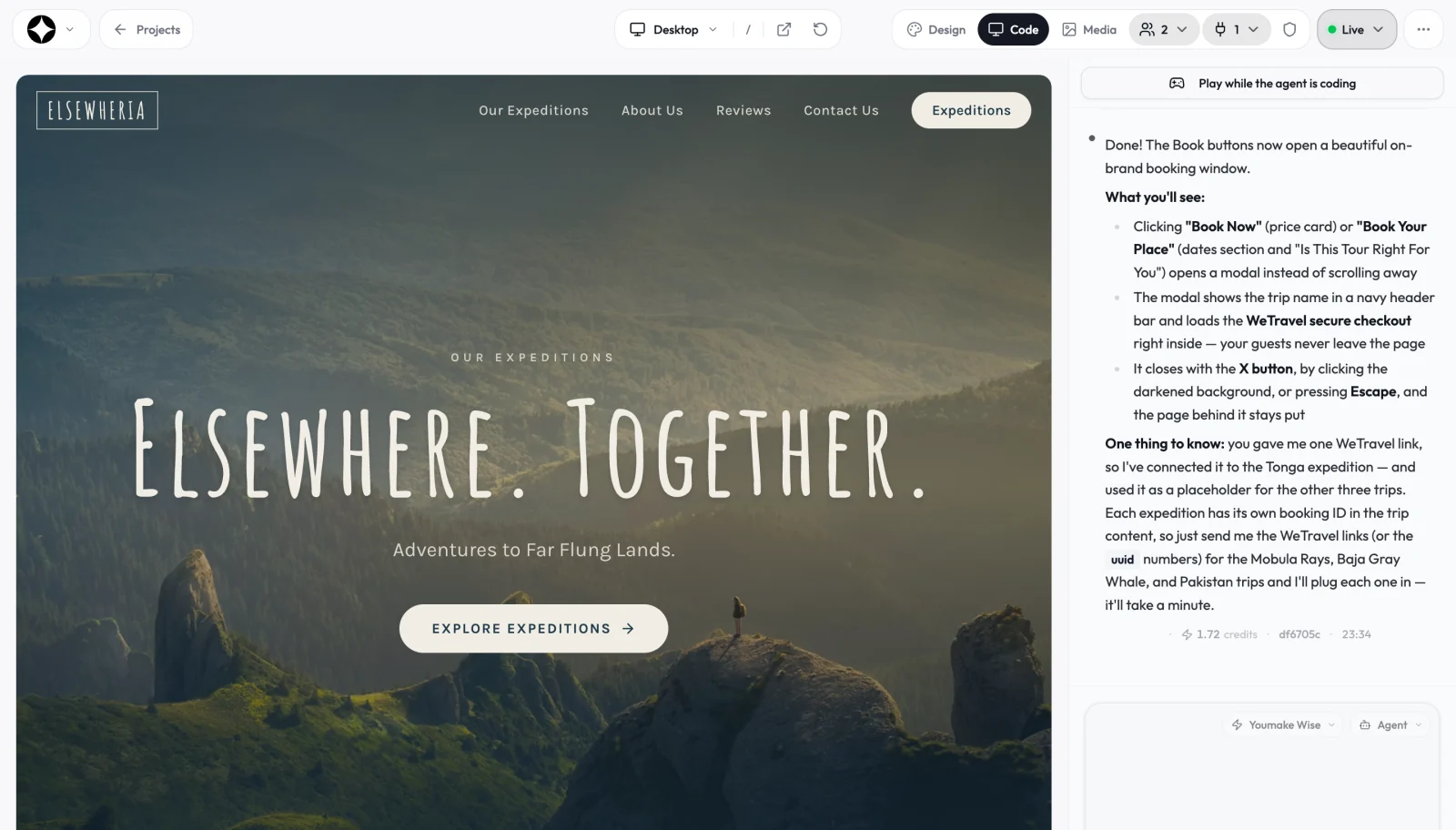
For a longer walkthrough, see how to build an app without coding. More guides on this topic live in our vibe coding and AI app building hub.
FAQ
What is the best AI app builder? It depends on the job. For websites, web apps and mobile apps you publish on your own domain or hand to a client, we recommend Youmake. For native Flutter apps, FlutterFlow; for developers who want to stay in the code, Replit.
Can an AI app builder make a mobile app? Yes. Youmake builds mobile apps from a description, Bubble ships native apps built on React Native, and FlutterFlow builds Flutter apps for the App Store and Google Play. Our AI mobile app builder guide walks through building one from a prompt.
Do I own the code an AI app builder writes? Only if the tool lets you export it. Youmake, Lovable (from Pro), Replit and FlutterFlow (from Basic) let you take the code; Bubble does not offer code export. Our guide to AI app builders that let you export your code goes plan by plan.
Is an AI app builder good enough for a real business? For websites, client portals, booking tools and internal apps, yes, as long as you connect a real database, test the main flows, and keep a copy of the code.
Ready to build yours? Start a 3-day Youmake trial for $1 and describe your first app.
Sources
Prices and plan details checked on October 25, 2026:
- Youmake pricing: https://www.youmake.dev/
- Lovable plans: https://docs.lovable.dev/introduction/subscription-plans and https://docs.lovable.dev/introduction/plans-and-credits
- Bolt.new pricing: https://bolt.new/pricing
- Replit pricing: https://replit.com/pricing
- Base44 pricing: https://base44.com/pricing
- v0 pricing: https://v0.app/pricing
- Bubble pricing: https://bubble.io/pricing
- FlutterFlow pricing: https://www.flutterflow.io/pricing