

Wix vs Squarespace comes down to what you want to control. Pick Squarespace if you want a polished site for less money and are happy to work inside its structured layouts. Pick Wix if you want a free plan to start, more templates, and more apps for bookings and selling. If you'd rather describe the site and also get a web app, a mobile app or slides from the same workspace, an AI builder like Youmake is the third option, and we cover when it wins at the end.
We make Youmake, so we watch this market closely. Everything about Wix and Squarespace below comes from their official pricing pages, blog and help centers, checked on October 27, 2026. We didn't build paid test sites on either platform, so there are no made-up speed scores here, only what each company publishes and what it means for you.
Disclosure: Youmake competes with both Wix and Squarespace. We've stuck to their own published facts, including where they beat us.
Wix vs Squarespace at a glance
| Wix | Squarespace | |
|---|---|---|
| Free plan | Yes, on a Wix-branded URL with ads | No; every site starts with a 14-day free trial |
| Paid plans (billed yearly) | $17 to $159 per month | $12 to $25 per month |
| Paid plans (billed monthly) | Not listed on the page we checked | $19 to $36 per month |
| Templates | "2000+ website templates" | Count not published |
| AI site builder | Wix Harmony, with the Aria agent | Blueprint AI |
| Taking payments | From Core | On every plan (Basic adds a 2% store fee) |
| Refund or trial | 14-day money-back guarantee on the first Premium upgrade | 14-day free trial |
Wix vs Squarespace pricing, plan by plan
The two price lists don't line up neatly, so here are the plans matched by what they unlock. Squarespace's pricing page shows both billing options. Wix's blog lists US prices for yearly billing; its plans page says prices and currency vary by location, so check the figure at checkout. For the full breakdowns, see our Wix pricing guide and Squarespace pricing guide.
| Tier | Wix plan (billed yearly) | Squarespace plan (yearly / monthly) |
|---|---|---|
| Entry | Light, $17/mo | Basic, $12/mo / $19/mo |
| Mid | Core, $29/mo | Core, $17/mo / $27/mo |
| Upper | Business, $39/mo | Advanced, $25/mo / $36/mo |
| Top | Business Elite, $159/mo | No equivalent listed (Squarespace offers no plan above Advanced on this page) |
What changes by plan:
- Wix Light gives you 2 GB of storage, a free domain for one year and 2 site collaborators, but no payments or ecommerce.
- Wix Core adds payments, "Basic eCommerce," scheduling, 50 GB of storage and 5 collaborators. Business moves to "Standard eCommerce," 100 GB and 10 collaborators. Business Elite adds "Advanced eCommerce," unlimited storage, an "Advanced developer platform" and 100 collaborators.
- Squarespace Basic includes templates, the drag-and-drop editor, up to 2 contributors, 30 minutes of video and unlimited product and service sales. Core adds unlimited contributors, advanced analytics, code injection and 5 hours of video. Advanced adds unlimited video, discounts, payment plans, carrier-calculated shipping and commerce APIs.
- Domains: both include one year of free domain registration (on Squarespace, with annual plans).
On price alone, Squarespace is cheaper at every matching tier. Wix's advantage is the free plan, which lets you build and publish before you pay anything.
Design and templates
Wix says it offers "2000+ website templates," all free to start from. Squarespace doesn't publish a template count on its templates page; it leans on fewer, design-led starting points plus its AI builder.
One detail worth knowing before you start on Wix: its help center says that "If you created a site with AI, you cannot change it to a different template." The workaround is to create a new site and move your Premium plan to it. So if you're unsure about the look, decide before you generate.
As a general pattern, Squarespace sites tend to look consistent because the editor keeps you inside a structured layout, while Wix gives you more freedom to place elements, which also makes it easier to end up with a messy page.
Ease of use
Both are no-code, drag-and-drop editors, and both now let you start with AI instead of a blank template.
- Wix starts you in a chat. In the Wix Harmony Editor, Aria asks questions about your business, fills in a site profile, then generates pages, layouts, colors, starter content and images that you keep editing by hand or by asking Aria.
- Squarespace starts you with questions too. Its blog says you "answer a few questions about your business, and it generates a multi-page website" with starter copy, images and a visual style you can revise.
If you've never built a site, both will get you to a first draft quickly. The difference shows up later: Wix gives you more apps and settings to manage, and Squarespace gives you fewer choices to make.
Ecommerce: Wix or Squarespace for selling?
| Wix | Squarespace | |
|---|---|---|
| Plan you need to sell | Core ($29/mo yearly) or higher | Any plan, from Basic |
| Platform transaction fee | Not mentioned on the pricing page | Basic: 2% on store sales, 7% on digital content and memberships. Core: 0% and 5%. Advanced: 0% and 0% |
| Card processing (US) | Wix Payments: 2.9% + 0.30 USD per card transaction (excl. American Express) | Rates not listed on the pricing page |
| Automated tax | Not stated on the pricing page | Not on Basic; 0.15% (max $0.99) per transaction on Core; 0.05% (max $0.99) on Advanced |
If you sell a few products, Squarespace Core at $17/month billed yearly removes the store transaction fee for a lower price than Wix Core. If you sell digital content or memberships, only Squarespace Advanced drops that fee to 0%. Wix's case is breadth: its higher plans add more ecommerce tiers and scheduling for service businesses.
SEO tools
Both cover the basics a small business needs. Neither will rank a site on its own; the content does that.
- Wix lists a personalized SEO setup checklist (with keyword research through Semrush), editable meta tags and canonical tags, an automatic XML sitemap, structured data on products, events and blog posts, an editable robots.txt, a 301 redirect manager with bulk import of "up to 500 URLs at once," and Google Search Console reports inside the dashboard.
- Squarespace's SEO checklist covers SEO titles and descriptions per page, URL slugs, alt text, redirects, a custom 404 page, an SEO report that flags missing alt text and descriptions, a search keywords panel, and verification with Google Search Console and Bing Webmaster Tools.
Wix gives you more technical controls (robots.txt, structured data, bulk redirects). Squarespace keeps the list shorter and easier to follow.
AI features each offers
| Wix | Squarespace | |
|---|---|---|
| AI site generation | Wix Harmony: chat with Aria to generate and edit the site | Blueprint AI: answer questions, get a multi-page site |
| AI on paid plans | "AI creation tools" on all Premium plans | Built-in AI tools on all plans; AI credits: 10 one-time on Basic, 20/month on Core, 120/month on Advanced |
| AI search visibility | AI Visibility tool tracks mentions in ChatGPT, Gemini and Perplexity | AI Visibility prompt runs: up to 10 one-time on Basic, 20/month on Core, 120/month on Advanced (English accounts only) |
| Other | AI help with Google Ads campaigns and ad copy; AI product recommendations | "Design Intelligence" for layouts; AI image generator |
Both treat AI as a fast way into their existing editor. You still end up maintaining a Wix site or a Squarespace site, on their hosting, with their editor. Neither pricing page lists exporting your site's code.
Wix or Squarespace: which should you pick?
- Pick Squarespace if you want the lower monthly price, a clean design without much fiddling, and the ability to sell from the entry plan.
- Pick Wix if you want to start on a free plan, need bookings and scheduling, want the larger template library, or want deeper SEO settings.
- Pick neither if you need more than a website: a client portal, a booking app, a mobile app, or a pitch deck for the same business. Or if you want the code in your own GitHub.
Need more than a site? Start a 3-day Youmake trial for $1 and build the site and the app from one description.
The third option: an AI builder like Youmake
Wix and Squarespace are website builders that added AI. Youmake is an AI app builder from the start: you describe what you want and it builds a website, web app, mobile app or slide deck, with a live preview and an agent chat for changes.
Youmake is the better choice when:
- You'd rather describe than drag. You write what the business needs and refine it in chat, without choosing a template first.
- The site is only part of the job. Websites, web apps, mobile apps and slides live in the same workspace, so the landing page, the customer portal and the investor deck stay in one place.
- You want to own the code. Export the code or sync it to GitHub, and import an existing repo. See how code ownership works in Youmake, or our guide to AI app builders that let you export your code.
- You want your own domain and real integrations. Publish to your own domain, and connect GitHub, Supabase, Stripe and Vercel. A security scan runs before publishing.
Where Wix and Squarespace are stronger: Youmake has no free plan (a 3-day trial costs $1, card required), and it doesn't come with a library of thousands of templates. Starter is $20/month ($16/month billed yearly) with 40 credits; Builder is $45 and Agency $120.
Wix also owns Base44, an AI app builder; our Base44 review covers how it compares.
How to do this with Youmake
-
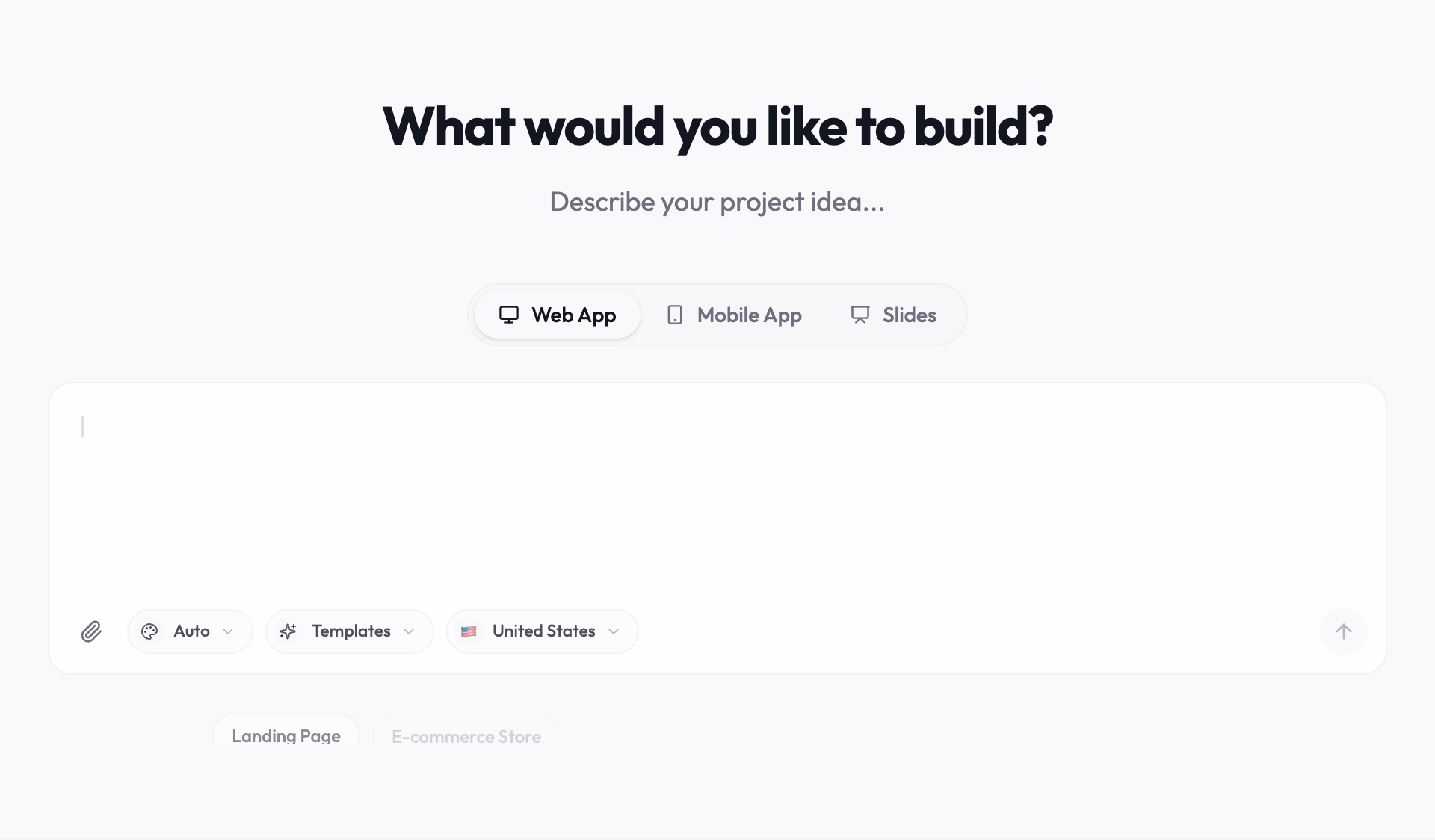
Start a trial at youmake.dev and choose what you're building in the composer.
-
Describe the site the way you'd brief a designer. For example:
Build a website for a small yoga studio in Austin: a home page with class times, a page for each teacher, a pricing page with three passes, and a contact form. Calm, light design with lots of white space.
-
Review the live preview and ask the agent for changes one at a time ("make the schedule a weekly grid", "add a FAQ to the pricing page").
-
Add a booking app or a slide deck for the same studio in the same workspace when you need it.
-
Connect your domain and publish, or export the code to GitHub.
Comparing more tools? Our list of the best AI website builders in 2026 covers seven of them, free AI website builders explains what each free plan really includes, and the best AI app builders guide goes further than websites. More guides live in the vibe coding and AI app building hub.
FAQ
Is Wix or Squarespace cheaper? Squarespace, at every matching tier. Billed yearly, Squarespace runs $12, $17 and $25 per month; Wix runs $17, $29, $39 and $159. Wix does have a free plan, on a Wix-branded URL with ads.
Is Squarespace better than Wix for ecommerce? For a small store on a budget, often yes: you can sell from Squarespace Basic, and Core ($17/month yearly) has no store transaction fee. Wix needs Core ($29/month yearly) to take payments, and adds more ecommerce tools on higher plans.
Which is better for SEO, Wix or Squarespace? Both cover titles, descriptions, redirects and Google Search Console. Wix offers more technical controls, such as an editable robots.txt, structured data and bulk redirects.
Can I export my site from Wix or Squarespace? Neither pricing page lists code export. If owning the code matters, use a builder that exports it, such as Youmake.
Want the site, the app and the code in one place? Start a 3-day Youmake trial for $1.
Sources
Checked on October 27, 2026:
- Wix plans: https://www.wix.com/plans
- Wix blog, premium plans and US prices: https://www.wix.com/blog/wix-premium-plans
- Wix templates: https://www.wix.com/website/templates
- Wix SEO tools: https://www.wix.com/seo
- Wix Payments fees: https://support.wix.com/en/article/wix-payments-transaction-fees
- Wix Harmony, creating a site with AI: https://support.wix.com/en/article/wix-harmony-editor-creating-a-site-with-ai
- Squarespace pricing: https://www.squarespace.com/pricing
- Squarespace Blueprint AI: https://www.squarespace.com/blog/blueprint-ai-website-builder
- Squarespace SEO checklist: https://support.squarespace.com/hc/en-us/articles/360002090267-SEO-checklist
- Youmake: https://www.youmake.dev/ and https://www.youmake.dev/features/code-ownership