


Adobe announced Adobe Firefly Builder on November 10, 2026, at its MAX conference in Miami Beach. You describe a website, presentation or app in plain language and get an interactive prototype you can edit on a canvas. It is in private beta, behind a waitlist, and Adobe has announced no price for it.
A prototype shows an idea. It does not take a booking or a payment, and it does not sit on your domain. If you need the published version this week, Youmake builds websites, web apps, mobile apps and slide decks from a description and publishes them to a domain you own. This article covers what Adobe confirmed, what it left open, and what to do while the waitlist moves.
What is Adobe Firefly Builder?
Adobe's press release describes Firefly Builder this way: it "helps creators transform ideas into interactive, on-brand prototypes, like a website, presentation or app, using natural language, with no code required for the initial prototype."
Adobe has confirmed three things about how it works:
- You prompt first and edit by hand after. Once the first prototype exists, the release says, "creators then edit any element directly on the canvas." You do not have to write a new prompt to move a button.
- A design system "keeps the project consistent" as you iterate.
- You can try several versions at once. Adobe's blog post lists "the ability to explore multiple creative directions in parallel," which means comparing two layouts without overwriting one with the other.
Builder arrived alongside two other new Firefly tools, both in beta: Firefly Design, a single canvas for brand and campaign work, and Firefly Graph, a node-based workflow builder. InsideAI News called Builder "a direct challenge to Figma's dominance in product design," and MakeUseOf's headline said Adobe is "taking vibe coding beyond apps."
If the term is new to you, our explainer on what vibe coding is covers the basics.
What Adobe has not said yet
I read the press release and the Adobe blog post for anything about shipping. Neither mentions:
- publishing to a custom domain, or hosting of any kind
- exporting the code or syncing it to GitHub
- a database, user logins or payments
- submitting a mobile app to an app store
- a price or a credit cost for Builder
Adobe may add some of these later, or may already have them in the beta without saying so. I do not know, and nobody outside the beta does either. What the announcement does establish is the word Adobe chose for the output, which is "prototype," in both documents.
So plan around what is confirmed. Firefly Builder is a design tool that produces something clickable to show a client or a team. It has no public date, and nothing Adobe published says it will get your business online.
What this changes for people who build with AI
Once designers who already pay for Creative Cloud get a prompt box that produces a clickable website, two things follow for freelancers, founders and small agencies.
Clients will expect to see something clickable early. A static mockup in a pitch will look slow next to a competitor who shows a working flow in the first meeting. That was already true for anyone using an AI app builder. Adobe's entry will spread the habit to designers who have never used one.
The prototype becomes the cheap part. If anyone can generate a convincing first screen, the work clients pay for moves to what comes after: real content, a form that sends email, a login, a payment, a domain, a hand-off. I think this matters more than the launch itself. A tool that stops at the prototype leaves that work to somebody else, and the client is paying for that work.
There is a practical trap here too. A prototype in one tool and a live build in another means building the thing twice. Before you start in any tool, check whether it can carry the project to launch. Our AI web app builder checklist lists six checks for that, and the guide to AI app builders that let you export your code explains why ownership should be on the list.
What to do now
- Join the waitlist if you live in Adobe's tools. If your brand assets are already in Creative Cloud, Builder may fit how you explore ideas. Adobe links the waitlist from its press release.
- Do not schedule client work around a private beta. There is no public date. A launch that waits on an invitation email has no deadline you control.
- Decide what you need: a picture of the product, or the product. For an internal pitch, a prototype is enough. For a restaurant that needs bookings by December, it is not.
- Write the brief once. Pages, sections, audience, tone, and the one action a visitor should take. That brief works as a prompt in any tool, so the time is not wasted whichever way you go.
- Build the live version now. The steps are below.
Start a 3-day Youmake trial for $1 →
How to build the live version with Youmake
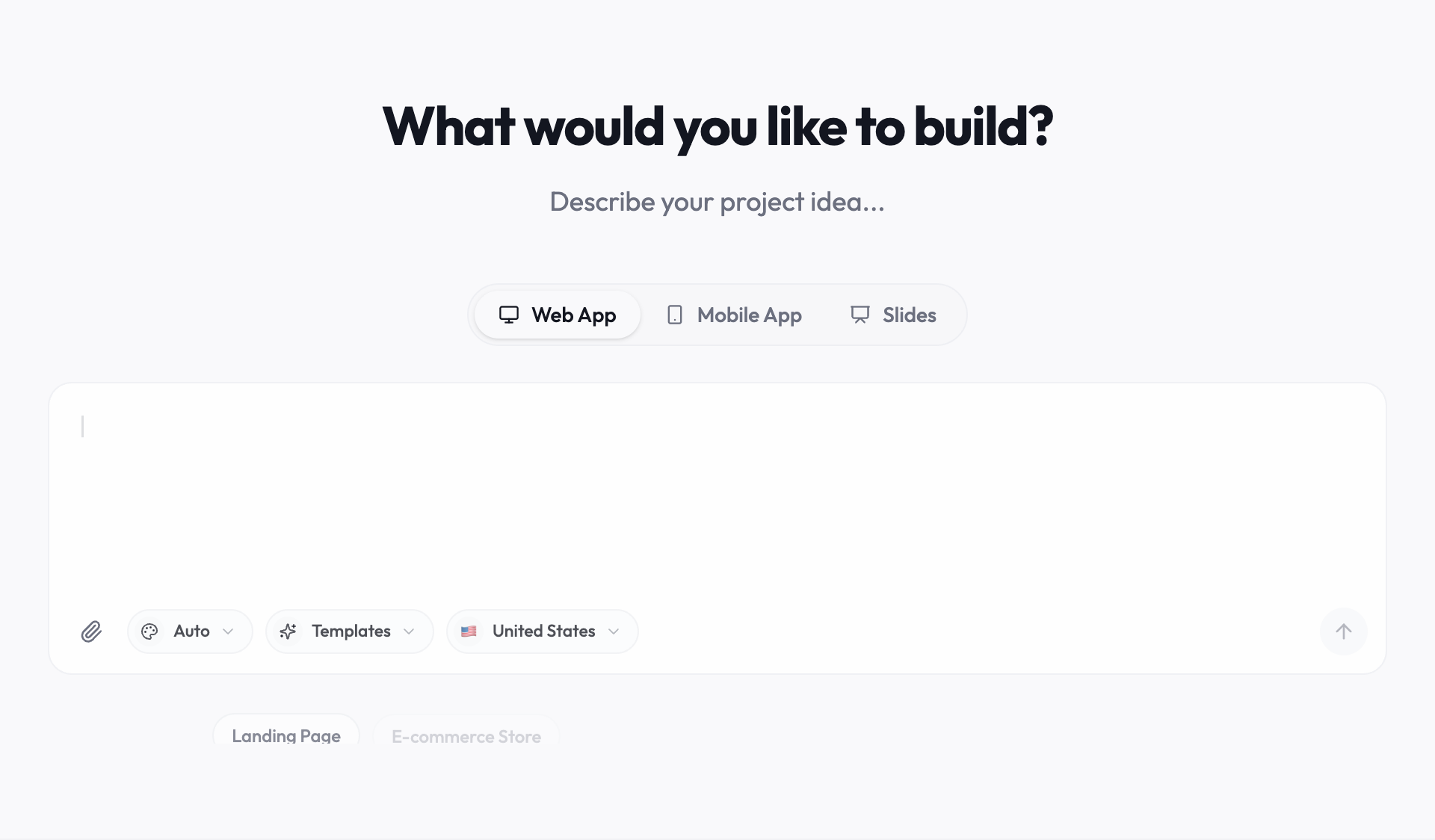
Youmake covers the same three outputs Adobe lists (a website, an app, a presentation) and adds mobile apps. Unlike a prototype, what you build gets published. Here is the path from prompt to a live site.
-
Pick the output in the composer. Website, web app, mobile app or slides. For a small-business site, start from the AI website builder.
-
Paste your brief as the prompt. For example:
Build a website for a two-person interior design studio in Portland. Pages: home, portfolio with six projects, services with three packages, and a contact page with a consultation request form. Calm, editorial look with large photos and a lot of white space. The main action on every page is "Book a consultation."
-
Edit in the agent chat with the live preview open. Ask for changes in plain language, such as "show the packages as three cards" or "add a FAQ under services." The chat shows what each request costs in credits.
-
Make a deck from the same brief. If you need the pitch as well as the site, start a slides project with the same description. You stay in one workspace.
-
Connect the parts that make it work. Youmake integrates with Supabase for data and logins, Stripe for payments, and GitHub and Vercel for code and deployment.
-
Run the security scan and publish to your domain. If a developer or the client takes over later, you can export the code or sync it to GitHub.
Agencies doing this for clients should read the client portal use case. If you want a first build to practice on, try one of these vibe coding project ideas.
Honest limits
- Youmake is paid from the first day. The trial is $1 for 3 days and needs a card. After that, Starter is $20 a month with 40 credits and Builder is $45 a month with 90 credits. Adobe has not said what Firefly Builder will cost, so I cannot compare the two on price.
- Adobe will probably be stronger on brand work. If your fonts, photos and brand kit already sit in Creative Cloud, a canvas inside that system is a real advantage for exploring looks. Youmake is not a design suite.
- Direct canvas editing is Adobe's pitch. In Youmake you make most changes by asking the agent. If you prefer dragging elements by hand, that difference matters.
- I have not tested Firefly Builder. It is a private beta, and this article relies on Adobe's own announcements and two news reports. Treat every comparison here as provisional until the tool is public.
- A security scan is not an audit. Review anything that handles payments or personal data yourself before launch.
For a wider view of the options, see our guide to the best vibe coding tools or browse the vibe coding hub.
FAQ
Is Adobe Firefly Builder available now?
Only by invitation. Adobe announced it on November 10, 2026, as a private beta with a waitlist. Adobe has not published a date for a public release.
Can Adobe Firefly Builder publish a live website?
Adobe has not said. Its press release and blog post describe the output as an interactive or working prototype and do not mention hosting, custom domains, code export, databases or payments. Check Adobe's documentation when the tool opens up.
How much does Adobe Firefly Builder cost?
Adobe did not announce a price or a credit cost for Builder. The press release points to the general Firefly plans page and says only that the new tools are in beta.
If you need a published site, app or deck before the waitlist reaches you, describe it in Youmake, edit it in the live preview, and publish it to your own domain.
Start a 3-day Youmake trial for $1 →
Sources
- Adobe Newsroom, "Adobe Firefly Expands as the AI Creative Studio" (November 10, 2026): https://news.adobe.com/news/2026/11/adobe-firefly-expands
- Adobe Blog, "Explore new ways to create across Creative Cloud and Adobe Firefly" (November 10, 2026): https://blog.adobe.com/en/publish/2026/11/10/explore-new-ways-create-across-creative-cloud-adobe-firefly-while-advancing-craft-precision-choice-control
- MakeUseOf, "Adobe is taking vibe coding beyond apps with these major announcements at MAX 2026" (November 10, 2026): https://www.makeuseof.com/adobe-taking-vibe-coding-beyond-apps-with-major-announcements-at-max-2026/
- InsideAI News, "Adobe Unveils Firefly Builder, MCP Integration at MAX 2026" (November 10, 2026): https://insideai.news/news/ai-tools/adobe-firefly-builder-mcp-integration/14902/